

Learn how correct conversion tracking within Google Tag Manager & GA4 positively affects Google Ad results
Google Ads conversion tracking is the underlying source for “performance”. Within Google Ads the most common lead based performance goals surround Conversions, Conversion Rate Or Cost Per Acquisition (CPA). If the underlying source for this data is inaccurate, then Google Ads conversion tracking can inflate reports, mislead bidding algorithms, and waste your ad spend by targeting low-value actions instead of real leads. Read on as I explore why inaccuracies culminate and how to solve them before the situation turns critical.
Common Google Ads Tracking Issues
The best ad copy, keyword targeting and campaign structure mean nothing if your conversion targeting isn’t set up properly!
If your marketing goals consist of brand awareness and only maximising the number of people on your site, then actively targeting page views and button clicks is okay. However, the true meaning of lead generation is targeting the correct audience and influencing them to complete an action which is Desired and has inherent value.
Primary vs Secondary Conversions in Google Ads Tracking
As directed by Google, when you set up tracking in Google Ads, not all actions are treated the same way. Google separates them into Primary and Secondary conversions.
Primary Conversions
- These are your main goals – the actions you care most about (like purchases, sign-ups, or phone calls).
- They’re shown in the Conversions column in Google Ads.
- Google also uses them to optimise bidding, meaning the system tries to get you more of these actions when spending your budget.
Secondary Conversions
- These are extra goals you want to track, but not optimise for (like someone downloading a brochure, watching a video, or clicking a certain link).
- They’re shown only in the “All Conversions” column in Google Ads.
- They don’t influence how Google spends your budget – they’re for insight and reporting only.
See the image below, this Google Ads account has Page View as a “Primary” conversion. Meaning that this account is actively reporting every page view as a “conversion” and if tied to an automatic campaign bidding strategy such as Max conversions or max conversion value will be optimised towards.
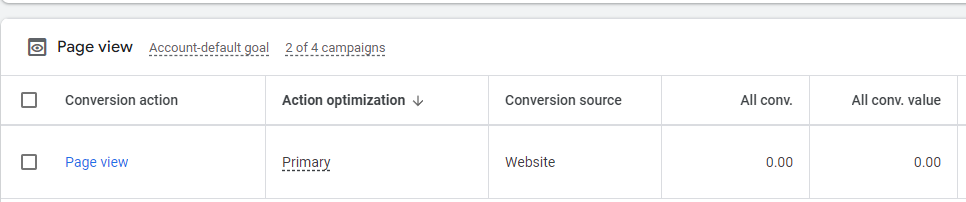
Other common poor primary conversion targets include internal button clicks, clicks to call instead of “calls from website” (with a minimum call length) and specific page views such as /contact-us. All of which, while desired, should not be bid towards.
How Incorrect Conversion Tracking Skews Google Ads Performance
As previously mentioned, the common performance metrics of lead generation are conversion based. Meaning that with broken, partly broken or non valuable conversion actions, you can not fully understand your Google ads performance. Any optimisations made at the campaign, ad group or even keyword level are based on wrong data and can lead to a significant decrease in long term performance.
Month-on-month data and Year-on-year data will be skewed, if conversion actions are changed in any way you are comparing apples with oranges. For instance, some clients whose Google Ads we have revamped have seen a drop in conversions of 200%, but that is a good thing, the name of the game is lead quality. You want people who are actually interested in you and engage in real business, not just someone who clicks around and bounces.
Why Incorrect Tracking Inflates Conversion Numbers and CPA
With incorrect reporting comes inflated expectations. It’s easy to look at the total conversions number in google ads, but the actual important numbers are the number of calls and the number of genuine form fills which can be converted into real revenue for your business.
Alongside an inflated conversion volume comes an unrealistic CPA. Some Google Ads accounts are running under the assumption that it’s only costing them $20-30 a lead when in reality, given a correct tracking set up this would be 3-10x more. Depending on the service or product, this is unprofitable and would need adjustment within audience or keyword targeting.
How Google’s Learning Algorithm Depends on Accurate Tracking
In today’s Google Ads environment, accurate tracking is no longer optional – it’s foundational. Auto-bidding strategies, Performance Max (PMax) campaigns, and machine learning models depend entirely on the quality of the conversion signals they receive.
When tracking is set up correctly in GA4 and GTM, every valuable customer action is captured and classified appropriately. This ensures Google’s bidding system isn’t just optimising for the wrong metric (like button clicks or page views), but is instead learning from high-value conversions such as phone calls, form submissions, or transactions.
Google’s automated systems use conversion feedback loops to validate their own performance. Over time, they refine targeting and expand to find new audiences that look similar to your converters. If your tracking setup feeds in weak or misleading signals, the system can waste budget chasing low-quality micro-actions instead of driving real business outcomes.
By contrast, when tracking is implemented cleanly and strategically:
- The learning period shortens because Google has reliable data to act on.
- Conversions are easier to scale, since the system knows exactly what “success” looks like.
- First-party data is maximised, helping you build stronger remarketing pools and customer insights.
Conversion Tracking Best Practices
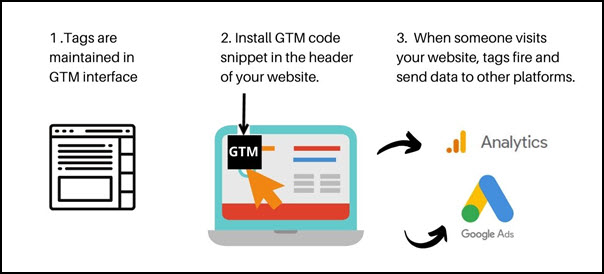
Google Tag Manager (GTM)
GTM is the control centre for creating and managing conversion actions. While it can look intimidating, a well-set-up GTM ensures your data is accurate and reliable.
- Make sure the container code is correctly installed on every page.
- Add a Google tag (G-XXXXXXXXX) and conversion linker to your property.
- Configure triggers carefully (e.g. “once per page” rather than “every time” for form fills).
- Test and refine tags with GTM’s preview/debugger.
- Don’t forget GDPR and consent compliance when tracking user data (Europe).
Google Analytics 4 (GA4)
GA4 is where your paid advertising data lives alongside organic, giving you a full picture of performance.
- Track all important user events, but only mark key events as conversion-worthy.
- Use the GA4 DebugView alongside event testing to ensure accuracy.
- Enable features like Google Signals and Enhanced Measurement for richer cross-device tracking.
- Configuring audiences and comparisons in GA4 helps you target high-value users for remarketing and gain insights to optimise campaign efficiency.
Google Ads
Google Ads uses conversion data to optimise campaigns and bidding strategies. If your goal is to drive qualified leads, keep these in mind:
- Allow time for campaigns to have proper learning periods to stabilise performance before adjusting to a conversion based bidding strategy, typically 30+ conversions in a 30 day period is needed.
- Import customised actions from GA4 or track directly via GTM using Google Ad Conversion tags to keep it first-party.
- Set only primary conversions for the actions that matter most (e.g. form fills, calls).
- Use secondary conversions for supporting insights without skewing bidding.
- Enable Enhanced Conversions through the Google Tag to track offline conversions using first-party data like emails or phone numbers, recovering accuracy lost to cookie or privacy restrictions.
- Consider assigning conversion values. With enough data, you can switch to “Max Conversion Value” bidding, weighting actions so Google prioritises the leads most valuable to your business.
Case Study: Correcting Conversion Tracking for Real Lead Growth
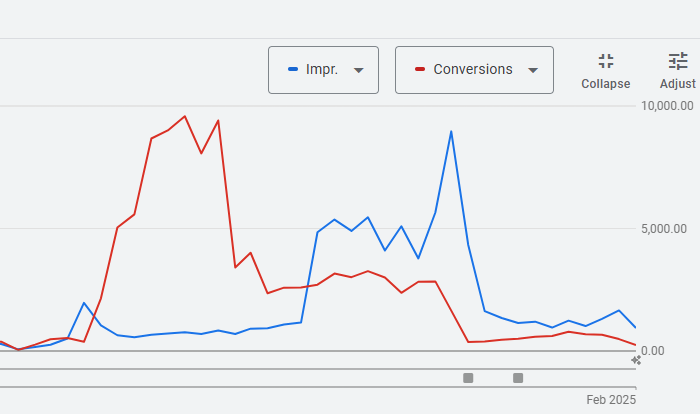
Follow the red line in the graph above, this line represents the number of conversions a client of ours achieved each month. We completed our account adjustments, where the first little grey box is (April 2024), conversions went down considerably. Oh no….
As mentioned however, this is actually good, at the peak in January 2023 this client was generating over 9000 conversions at a monthly ad spend of $5000-6000, this is not optimised!
The problem:
Primary conversion actions including CTA button clicks, miscellaneous button clicks and contact page views. While these are interesting numbers they are not something that we want to optimise our Google Ads towards.
The solution:
A full conversion review was completed, new conversion actions including “form submit”, “enquiry form” and calls from the website (minimum 30 sec) were built out. These replaced the non valuable actions as primary.
The result:
This sent the Google Ads into a new learning period, but afterwards it emerged as a new account. The conversion actions quickly started firing and the campaigns were switched to a “max conversions” bid strategy. From here we scaled the account to now generate 500-600 “real conversions” which almost all are confirmed leads within their CMS. Google Ads now have a much larger impact on their business, and we can confidently know that growth in their Google Ads represents Growth within the wider business.
In Summary: Smarter Google Ads Tracking Starts with Better Data
Accurate Google Ads conversion tracking is the foundation of meaningful performance. When Google Tag Manager (GTM) and Google Analytics 4 (GA4) are configured correctly, every conversion action is measured and reported with precision.
Primary conversions: like form submissions and phone calls, should guide your bidding, while secondary actions remain for insight only. Using GA4’s enhanced conversions, data layer variables, and a correctly implemented conversion linker tag ensures your conversion data reflects genuine customer behaviour.
Common tracking issues: duplicate tags, page load triggers, or missed key events, can distort reporting and waste budget. GTM simplifies your tracking setup, allowing you to debug, refine, and scale confidently.
In short, effective ads conversion tracking turns data into insight, and insight into growth. Getting it right means Google’s algorithms optimise for real leads, rather than noise, saving ad spend and amplifying your ROI.
Google Ads Tracking Support & Setup Services
Scared, confused or both? Google Ads conversion tracking setups are one of the hardest yet most important areas of the platform. If you’re not convinced your tracking is up to scratch then have a chat with us!
As a Google Ads agency specialising in advanced tracking, we deliver custom tracking setups and full campaign management. Our team conducts GA4 and GTM conversion audits to turn misleading metrics into real business growth. Every project includes a tailored KPI dashboard, giving you a clear view of your paid advertising performance and the confidence to make informed business decisions.